

Shares and burst
A share is the part of a pool one key may spend. Burst lets members spend past their share from a part of the pool nobody owns.
Equal and manual shares
| Mode | Share per key |
|---|---|
| Equal | The pool's limit divided by the number of keys in it. It updates when keys are added or removed. A person who holds two keys in a pool has two shares. |
| Manual | An amount you type for each key. Keys with no amount have a share of zero. |
Without burst, a key's share is a hard cap. A key with a share of zero cannot spend. Manual shares cannot add up to more than the pool's limit.
Change shares on an existing pool
Admins and the pool's lead change shares on the Keys tab of the pool.
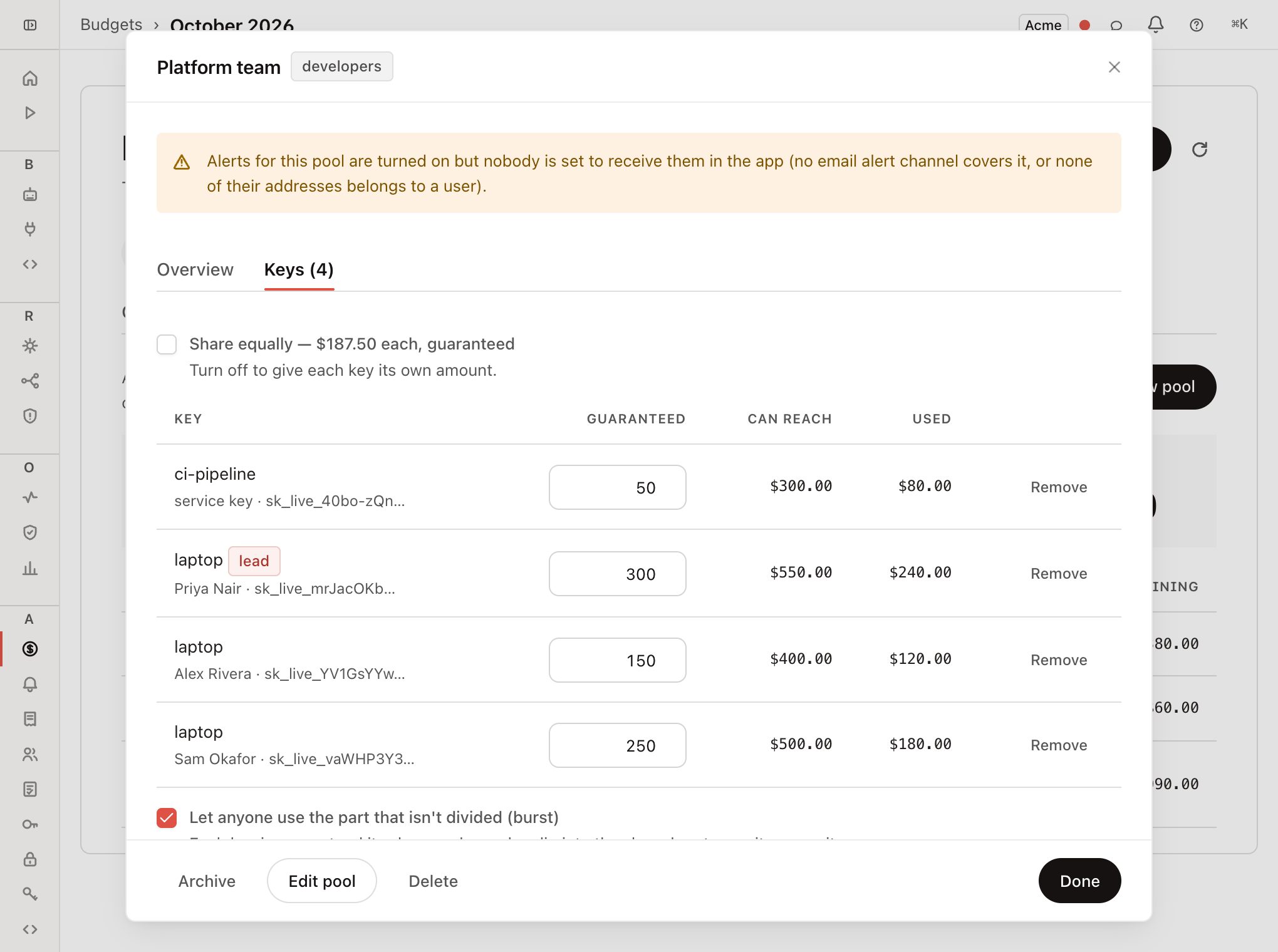
Open the pool
On Budgets → Pools, click the pool, then the Keys tab.
Turn off Share equally
This switches to manual. Each key's current share fills in, so no one's cap changes until you edit it.
Type each key's share
The line under the table shows how much of the pool is divided and how much is left.
Click Save shares
New caps apply to the next call.
To add or remove a key or a person, use the dropdowns under the table. This is admin-only. Adding a person who has no key issues them one, which they reveal themselves (see Budget pools). A lead asks for a new member with a request.
Burst
With burst on, only part of the limit is split into guaranteed shares. The rest is a shared zone that anyone in the pool may use once they pass their own share.
A member's cap is their share plus whatever is left of the shared zone. Nobody can use another member's unspent share.
Example. A pool has a limit of $1,000. The guaranteed part is 75%, so $750 is split into shares and $250 is the shared zone. One member has a share of $300. They can spend their $300, then draw on the $250 until it is used up. Another member's unspent $200 share stays reserved for that member.
Turn on burst
The burst toggle is where you divide the budget: in the New pool form and on the Keys tab. It reads Let anyone use the part that isn't divided (burst).
| Shares are | What you set |
|---|---|
| Equal | The percentage guaranteed to members. The form shows the dollar split. |
| Manual | Nothing. The guaranteed part is whatever your shares add up to, and the undivided rest becomes the shared zone. |
The guaranteed part is stored as a whole percentage of the limit, rounded up so your shares always fit. On an $800 pool with $750 divided, the guaranteed part is 94%, which is $752, and the shared zone is $48.
Burst with manual shares needs at least one key to have a share.
To cap how much of the shared zone one member can take, set member_max_usd through the API. The console does not expose it.
When the limit changes
Raising the limit keeps the guaranteed percentage. On a manual pool, the new guaranteed money has no owner, so the pool shows the warning unallocated budget and nobody can spend it.
To fix it, open the Keys tab and either:
- turn on burst and click Save shares, which recalculates the guaranteed percentage and makes the undivided part the shared zone, or
- raise the shares so they cover the new guaranteed part.
Lowering the limit below the amount already divided is refused with pool_limit_below_allocations. Reduce the shares first.
Warnings
Warnings appear at the top of a pool's detail for admins and the lead. They never block a save.
| Code | What it means |
|---|---|
pool_limit_exceeds_workspace_budget | The pool's limit is above the workspace budget. This happens when the workspace budget is lowered after the pool was created. The workspace cap stops spend first. |
pools_oversubscribed | All live pools together are above the workspace budget. They share it, so they cannot all reach their limits. |
unallocated_budget | Part of the guaranteed amount is not divided, so no one can spend it. |
members_without_a_share | Keys with a share of zero are blocked. |
members_at_their_cap | Keys have used their whole share. |
keys_exceed_share | A member key has its own cap above its share. Both are enforced and whichever is reached first blocks the key. This is allowed. |
nobody_will_be_alerted | Nobody would get an in-app alert: with "Notify the same people in the app" on, no email channel covering the pool belongs to a user. With it off, there is no lead, no extra people, and admins are set to never. |
no_lead | The pool has no lead, so only an admin can change shares. |
ends_soon | The pool ends within seven days. |